Review Comments (1) Screenshots (4) Questions & Answers (0) Votes (2) Awards (3) Wiki  
(2)
Winstep Software Technologies
1.6.0.92
www.winstep.net
Freeware
313 people
Download Winstep Start Menu...

Downloaded 686 times

It is possible that the download link provided above does not refer to the intended version. If you are looking for Winstep Start Menu Organizer, you may try searching for a download link using Google.


Review

This is official description applies to version 1.5

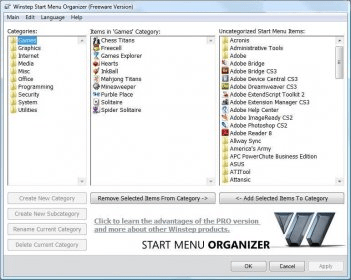
The Winstep Start Menu Organizer is an application designed to help you organize and clean your Start Menu.
Over time, as more and more applications get installed, the Start Menu can get so cluttered that you end up spending a lot of time just trying to find that program you want to run. This is where the Winstep Start Menu Organizer comes in: it allows you to quickly group your Start Menu shortcuts into a specific set of categories (e.g. Utilities, Internet, Office, etc...) thus making finding what you are looking for a lot easier and much faster!
 
The following review written by one of the Software Informer contributors applies to version 1.1

Winstep Start Menu Organizer is a free program developed by Winstep Software Technologies that organizes and cleans the Windows Start Menu. It is also compatible with Windows Vista. It happens many times that we are left with shortcuts of uninstalled programs in the start menu. This makes the start menu pretty much cluttered up with unnecessary entries which are pretty irritating. This is where Winstep Start Menu Organizer comes in handy, it helps in sorting out the start menu shortcuts in a number of categories (e.g. Utilities, Internet, Office, etc...) that makes it easier to look for the software you want to run. You can also create you own custom categories and sub categories. This program has many features such as full drag & drop support with multiple item selection, it also provides a Start Menu backup and Restore support. It automatically removes dead shortcuts. Winstep Start Menu Organizer also has a multilanguage support with an update manager that checks for updates automatically.
  • Intiutive Interface.
  • Start Menu backup.
  • Drag & drop support.
  • Not found.

Reviewed by: Vineet Sharma

Reviewer rating:

Reviewed: 3 years ago

Report a wrong version Report a wrong program title Suggest a correction

Screenshots

Main window Main window About About Start Menu Backup Start Menu Backup Main Interface Main Interface

Latest comments

kannan(fan) Last year 
can arrange the startup the way u want.very usefull for quick access of installed softwares.
Reply
Add new comment

E-mail Address:

Password:

Register now »

Forgot password?

Sign in with:
Download Software Informer Client
Copyright © 2012, Informer Technologies, Inc. About| Privacy and terms| Help| Feedback & Support| Partners program